

Loom Alternatives for Polished Product Demos in 2026
Loom is great for quick async clips. For a polished, reusable product demo, compare three other routes and see when Loom is still the better pick.
 Baltej Singh · Founder, DemoVexa 4 min read
The best Loom alternative for a polished product demo depends on what you start with: if you have the product code, a tool that builds the video from code (like DemoVexa) gives clean, repeatable demos; if you need a presenter on screen, an avatar tool like Synthesia fits. If you just need to show a teammate something today, keep using Loom.
Competitor facts last checked on loom.com and synthesia.io on 25 October 2026. Plans change, so check again before you buy.
When is Loom still the right tool?
Loom is the right tool when the video is personal, fast and short-lived. A bug report, a code review walkthrough, a reply to a customer question: you hit record, talk, and send a link. Viewers can comment and react, and Loom shows you who watched.
On 25 October 2026, Loom's pricing page listed a free Starter plan (25 videos per person, 5-minute recordings, up to 720p), Business at $18 per user a month (unlimited recording, basic editing, up to 4K) and Business + AI at $24 per user a month, which adds filler word removal, auto titles, summaries and chapters, and editing by transcript. Enterprise is priced by sales.
If your demo is a one-off, stop here. Loom is cheaper in time than any tool below.
Why do Loom demos stop working for public product videos?
A screen recording captures one take of one version of your product. That causes three problems for a public demo:
- Every release breaks it. A renamed button or new menu means you record again. We covered how to deal with that in fixing a demo video after a UI change.
- The data on screen is yours. Real customer names, test accounts and half-finished features show up unless you stage a clean account first.
- One take means one format. A 16:9 recording cropped to 9:16 for social usually cuts off the part that matters.
None of these are Loom's fault. They come from recording a screen at all.
What are the main alternatives, and who is each for?
Build the video from your code (DemoVexa)
DemoVexa is a desktop app that reads your product's local code folder and docs, writes a script, adds a voiceover and rebuilds your real screens as animated components. Nothing is recorded, so there is no retake when the UI changes: you pull the latest code and rebuild. You get 1080p MP4s in 16:9, 9:16 and 1:1, each laid out for its frame, plus SRT and VTT captions.
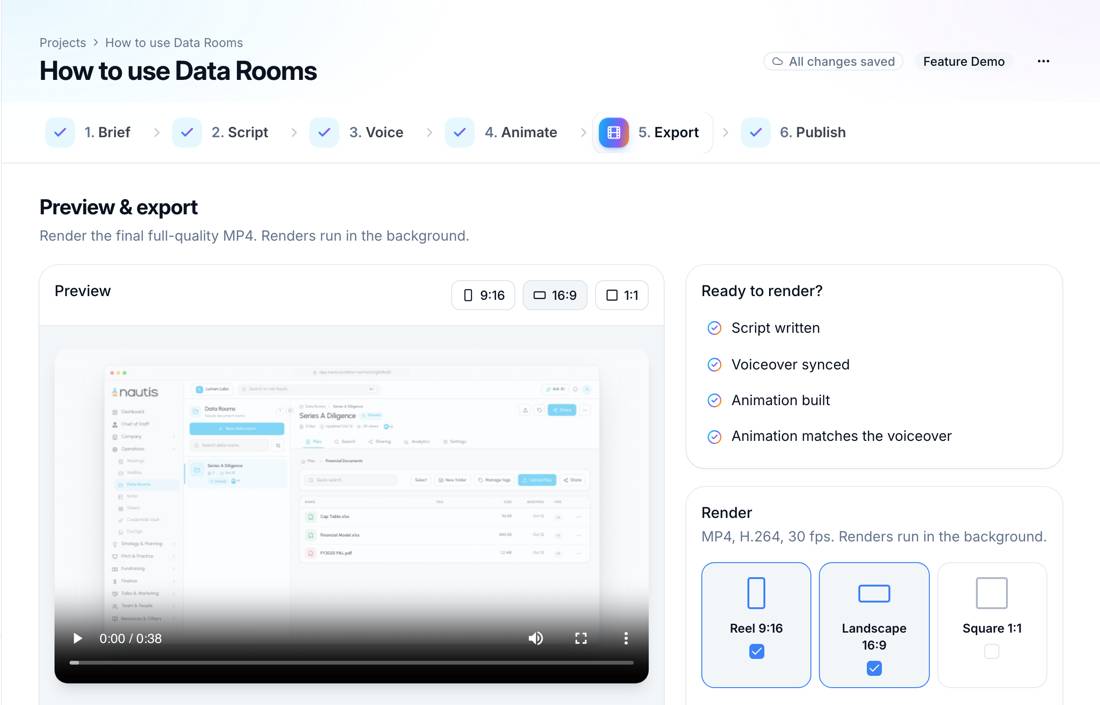
The screenshot shows DemoVexa making a video for Nautis, a sample product we use for testing. Pick this route when the demo is public, reused for months, and has to keep up with releases. Skip it if you have no access to the code; it can work from a website and documents, but screens are recreated less exactly. Plans start at $29 a month after a 14-day trial (pricing), and you also need your own AI provider account.
Use an AI presenter (Synthesia)
Synthesia makes videos with AI avatars reading your script, in 140+ languages and voices on paid plans. On 25 October 2026 it listed a free Basic plan (10 minutes of video a month, watermarked), Starter at $29 a month and Pro at $89 a month on monthly billing. Its site also lists an AI Screen Recorder Chrome extension.
Pick it when a human face explaining a process matters more than showing exact product screens, for example in training or onboarding. We compare the two head to head in DemoVexa vs Synthesia.
Keep recording, but edit more
If you like recording, the Loom Business + AI tier itself is an option: trimming, filler word removal and transcript editing take a lot of the roughness out of a take. It does not solve the stale-on-every-release problem, but for a demo that changes twice a year it may be enough.
How do I choose in one minute?
Ask two questions. Will this video still be public in three months? Will the screens change before then? Two yeses point to a build-from-code tool. A yes to the first and a no to the second means a well-edited recording is fine. Two noes means use Loom and move on.
For a wider list of tools by category, see our product demo video tools roundup, and for the full feature table see DemoVexa vs Loom. If you already send recorded demos to prospects, our post on sending a demo video instead of booking a call covers what to put in them.
Frequently asked questions
What is the best free Loom alternative for product demos?
It depends on the format you need. Synthesia has a free Basic plan with 10 minutes of watermarked video a month, and DemoVexa has a 14-day trial with 3 videos and 15 renders. Loom itself has a free Starter plan if short recordings are enough.
Is Loom good for product demo videos?
Loom is good for personal demos sent to one person or a small team. For public demos on a website or YouTube, the need to re-record after each UI change and to stage clean data makes it harder to maintain.
Can I use Loom and DemoVexa together?
Yes. Many teams use Loom for internal updates and quick replies, and a build-from-code tool for the public product demo. They solve different problems, so there is little overlap.
Does DemoVexa record my screen?
No. DemoVexa reads your local code and docs and rebuilds the screens as animated components. Your code folder is not uploaded to DemoVexa; relevant parts go to your own AI provider account.
Keep reading
All posts
Synthesia Alternatives When You Need Real Product UI
Avatar videos and product UI videos solve different problems. How to tell which one your demo needs, with Synthesia facts checked on 25 October 2026.
Baltej Singh 3 min read
Can AI Make a Demo Video Without Screen Recording?
How AI builds a product demo video from code instead of a screen recording: what it reads, how screens are rebuilt, and the limits to know about.
Baltej Singh 2 min read
From GitHub Repo to Demo Video: A Timed Walkthrough
A build log of turning a cloned GitHub repo into a narrated demo video with DemoVexa, step by step, including what DemoVexa can and cannot read.
Baltej Singh 3 min read